Ocean Optics USB2000 firmware update
Introduction
The Ocean Optics USB2000 is a compact crossed Czerny-Turner type spectrometer with SMA905 fiber-optic input and a 10-pin IO header (the connector is a Samtec IPS1-105-01-S-D-RA, available from Mouser).
…and the real thing:
While it is rare to find units that are configured to measure spectra beyond 880 nm…
Directly flashing the EEPROM that stores the firmware
You will need:
- Arduino Uno
- Arduino (wireless) SD shield
- 4× mini probing grabbers
- SD card
- Jumper cables
Opening up the USB2000
Use a razor blade or a suitable alternative…
If you have located all four corner screws, unscrew them.
Once the screws are removed, pull the lid up…
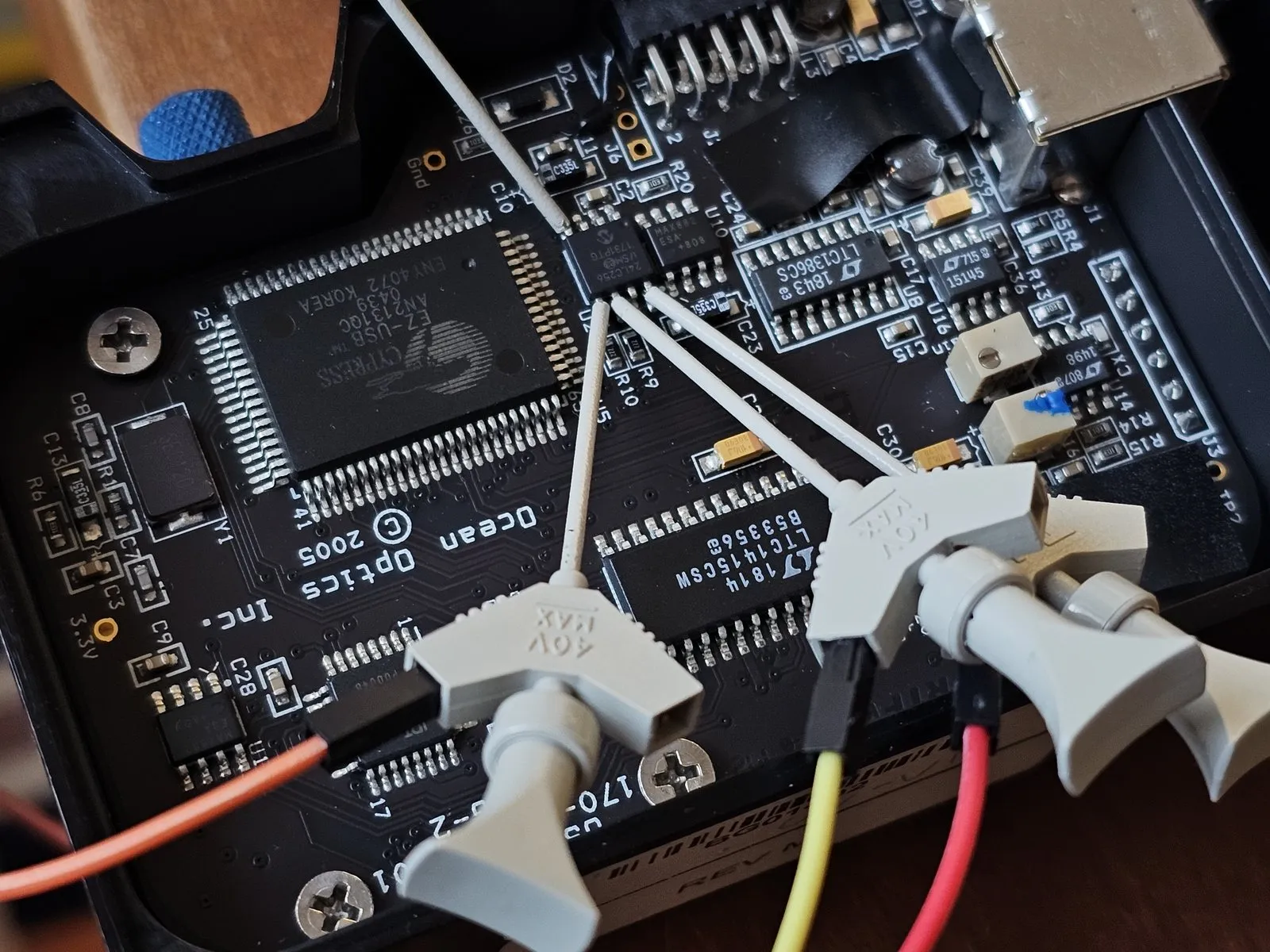
Connecting to the EEPROM
First locate the EEPROM on which the firmware is stored…
Close-up view:
Now use mini probing grabbers to connect to the following pins:
- VCC to a +3.3 V or +5 V supply
- VSS to GND
- SDA to Analog Pin 4
- SCL to Analog Pin 5
It should look something like this:
Flashing the EEPROM
Load the firmware file usb2000v2510.iic onto the SD card. Now put the SD card into the Arduino SD shield. Use the Arduino to run the following code:
#include <SPI.h>
#include <SD.h>
#include <Wire.h>

#define PROG_FNAME      "USB200~1.iic"
#define PROG_VERIFY     0

#define PIN_SDCARD_CS   4

#define UART_BAUD       9600

#define EEPROM_I2C_ADDR 0x51
#define EEPROM_BASE     0

Sd2Card card;

byte eeprom_read(int i2c_addr, unsigned int dev_addr)
{
    byte data = 0xff;

    Wire.beginTransmission(i2c_addr);
    Wire.write((int)(dev_addr >> 8));
    Wire.write((int)(dev_addr & 0xff));
    Wire.endTransmission();
    Wire.requestFrom(i2c_addr, 1);

    if (Wire.available())
        data = Wire.read();

    return data;
}

int eeprom_write(int i2c_addr, unsigned long dev_addr, byte data)
{
    Wire.beginTransmission(i2c_addr);
    Wire.write((int)(dev_addr >> 8));
    Wire.write((int)(dev_addr & 0xFF));
    Wire.write(data);
    Wire.endTransmission();

    return 0;
}

int prog_eeprom(const char *fname)
{
    char buf[64];
    uint8_t e_byte;
    uint8_t f_byte;
    File f;
    char c;

    Serial.println("Opening firmware file");

    f = SD.open(fname, FILE_READ);
    if (!f) {
        Serial.println("Could not open file");
        return -1;
    }

    Serial.print("Will reprogram EEPROM. Continue? [y/N]");
    while (!Serial.available()) {
        yield();
    }
    c = Serial.read();
    if (c != 'y') {
        Serial.println("Aborting");
        return -1;
    }

    Serial.println("");
    Serial.print("Programming EEPROM (");
    Serial.print(f.size());
    Serial.print(" bytes)\n");

    for (unsigned long i = 0; i < f.size(); i++) {
        f_byte = f.read();
        eeprom_write(EEPROM_I2C_ADDR, EEPROM_BASE + i, f_byte);
        delay(10); /* usec */
#if PROG_VERIFY
        e_byte = eeprom_read(EEPROM_I2C_ADDR, EEPROM_BASE + i);
        if (f_byte != e_byte) {
            sprintf(buf, "Could not verify byte at %08x: 0x%x (should be 0x%x)", i, f_byte, e_byte);
            Serial.println(buf);
            return -1;
        }
#endif /* PROG_VERIFY */
    }
    f.close();

    return 0;
}

void setup()
{
    int rc;

    Wire.begin();

    Serial.begin(UART_BAUD);
    while (!Serial)
        ; /* wait for serial monitor */

    Serial.println("Initializing SD card");

    if (!SD.begin(PIN_SDCARD_CS)) {
        Serial.println("Could not initialize SD card");
        while (1);
    }

    Serial.println("Programming EEPROM");
    rc = prog_eeprom(PROG_FNAME);
    if (rc) {
        Serial.println("Programming failed");
        while (1);
    }
    Serial.println("Programming complete");
}

void loop()
{
    /* stub */
}
After this, your USB2000 spectrometer should have been flashed… Good luck and have fun!